

How to Use AI in Your Job Search Without Losing Your Own Voice
Use AI to explore job roles, refine applications, and practise interviews while keeping your claims truthful, your voice natural, and your choices your own.
KnowledgeGate Team
Exam prep & CS education
Updated 31 Oct 20266 min read
AI can help you find job openings, organise your experience, improve a resume, and practise interview questions. It can also make your application sound like everyone else’s—or add claims you never made. Use it as a search and editing assistant, while keeping your real experience, choices, and words at the centre.
What “your own voice” means in a job search
Your voice is more than a writing style. It is the specific way you explain what you have learned, what you contributed, what interests you about a role, and how you think through a problem. A polished paragraph is not useful if you cannot explain it in an interview or if it describes work you did not do.
LinkedIn’s guidance for candidates in its own hiring process makes this distinction clearly: AI may help draft or refine a resume and cover letter, but the material should accurately represent your experience; preparation should support, not replace, your own perspective. That is one employer’s policy, so check the instructions for each application, assessment, and interview.
Use AI to explore roles, then verify the openings
You can use an AI assistant to turn a broad goal into a clearer search. Instead of asking only for “tech jobs,” give it your location, education level, preferred work type, genuine skills, and fields you want to explore. Ask it to suggest search terms and adjacent job titles—not to decide which role you should take.
For example:
I’m a final-year computer science student in Pune. I have coursework in Python and SQL and one college project using both. Suggest entry-level role titles and search phrases that could fit. Separate roles that require experience from those that may accept fresh graduates. Do not claim I have professional experience.
LinkedIn’s AI-powered job search is one example of a platform that lets members describe a role in ordinary language. Its guidance recommends specifying factors such as location, experience level, skills, or industry. Whichever platform you use, open the original listing and confirm the employer, eligibility, location, deadline, and application process. Search suggestions are leads, not verified vacancies.
Give the tool facts, not permission to invent
Before asking AI to edit your resume or cover letter, make a short fact sheet for each project or experience:
What was the project or responsibility?
What did you personally do?
Which tools or concepts did you use?
What changed or worked as a result?
What can you demonstrate or explain if asked?
If you do not have a measured result, do not ask AI to make one up. A clear description of what you built is better than an unsupported percentage or claim about impact.
Try a prompt like this:
Improve the clarity of these resume bullets using only the facts below. Do not add numbers, users, outcomes, skills, or leadership claims. If a detail is missing, ask me a question instead of filling it in. Keep the wording direct and suitable for an entry-level resume.
Then compare each suggestion against your fact sheet. LinkedIn’s resume tips warn that AI suggestions can contain inaccuracies and recommend checking them for authenticity and appropriateness. Treat every result as an edit proposal, not a ready-to-submit answer.
Ask for options, then choose the wording that sounds like you
AI is useful when you are stuck on a blank page. Ask it for three ways to describe one real project: a concise resume bullet, a cover-letter sentence, and a short interview explanation. Keep the version that is accurate and easiest for you to say naturally. Replace vague phrases such as “results-driven team player” with a detail that only you can support.
For example, instead of accepting “Demonstrated exceptional leadership and delivered measurable impact,” a student who worked on a class project could say:
Built the search and input-validation features for our library app, then tested them with valid and invalid entries before the class demonstration.
The second version is specific without pretending that a classroom project was a company-wide deployment. If the AI suggests an achievement you cannot point to in your work, remove it or rewrite it.
You can also ask AI to critique a draft without rewriting it:
Tell me which sentences sound generic, which claims need evidence, and what a recruiter might ask me to explain. Do not rewrite the paragraph. Ask one follow-up question at a time.
That keeps you in the author’s seat and helps you improve the underlying story instead of just polishing the surface.
Use AI for interview practice, not interview impersonation
Mock interviews are a good place to practise. Ask the tool to pose one question at a time, wait for your answer, and then point out where you could add a concrete example or explain a decision more clearly. Do not memorise a generated script. Practise from your own project notes, then answer in your normal speaking style.
Check the employer’s instructions before using AI during a live interview or technical assessment. LinkedIn’s candidate guide, for example, says candidates should not use AI during live interviews or technical assessments unless the recruiter or assessment instructions explicitly allow it. Other employers may set different rules. If you are unsure, ask the recruiter before the interview begins.
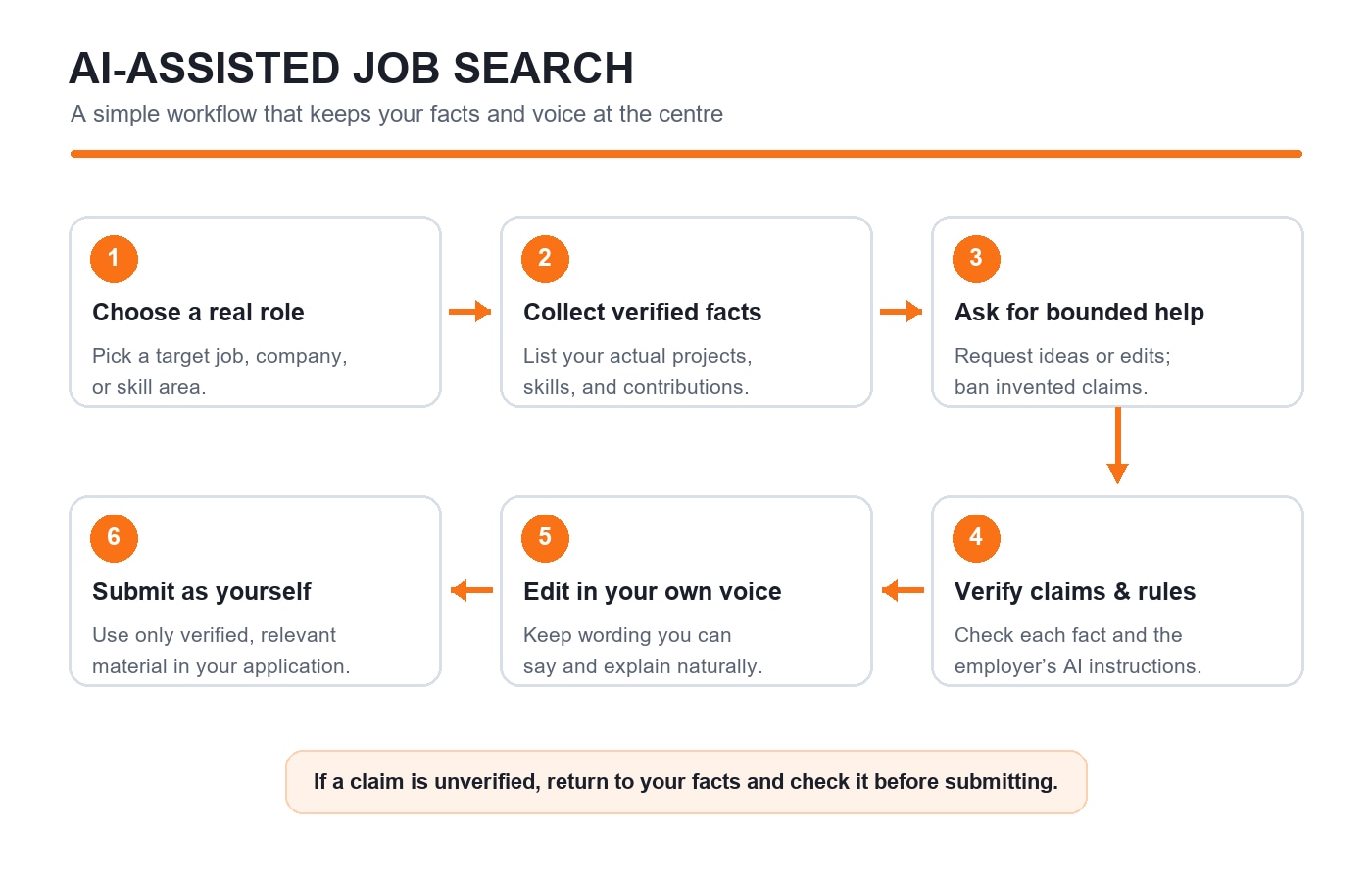
A simple AI-assisted job-search workflow
Choose a real target. Identify a role, company, or skill area you want to explore.
Collect the facts. Save the job description and write down only the experience you can support.
Ask for bounded help. Request search terms, feedback, structure, or practice questions; tell the tool not to invent facts.
Check every claim. Verify titles, dates, tools, results, and qualifications against your records.
Edit in your own words. Read the final application aloud. Replace lines you would not naturally say or be able to explain.
Follow the rules. Check the employer’s AI policy for written applications, take-home tasks, interviews, and assessments.
Do not paste confidential employer information or personal details you do not need to share. Review the AI service’s privacy settings and data terms, and remove contact details from a resume before asking for general editing feedback.
Avoid these common shortcuts
Mass-generating applications: a high application count does not help if the role, facts, or employer details are wrong. Tailor only where your experience genuinely matches.
Copying every keyword: use a job-description term when it accurately describes your work, and pair it with evidence. Do not add skills you cannot demonstrate.
Sending a generic networking message: mention the real reason you are contacting that person and ask one specific, respectful question.
Submitting a script you cannot defend: if a recruiter asks how you reached a conclusion, you should be able to explain it without rereading an AI answer.
Treating privacy controls as a substitute for judgment: settings differ across services and accounts. Share only what is appropriate for that tool and task.
Make the final application sound like you
Before submitting, ask yourself: Is every claim true? Can I explain the project and my contribution? Does this wording sound like something I would say? Have I checked the original job listing and the employer’s AI rules? If you answer no, revise before you apply.
KnowledgeGate’s Interview & Resume Preparation course can support your application and interview practice. If you want to understand the tools you are using, explore the Artificial Intelligence course. For more on showing real skills during changing campus recruitment, read AI Is Changing Campus Hiring: How Students Can Show Their Skills.
Use AI to get unstuck, see options, and practise. Let your verified experience decide what stays—and make sure the person who submits the application is still you.
Keep learning

How to Compare Job Offers Beyond Salary
Compare job offers using dependable pay, benefits, learning, work expectations, flexibility, and your own career priorities—not just the headline salary.
Updated 31 Oct 20266 min readPlacement Preparation

What to Do When You Have No Internship Experience
No internship yet? Turn coursework, projects, volunteering, and other real experience into credible evidence for entry-level roles.
31 Oct 20266 min readPlacement Preparation

Which Skill Sets Are in Demand for Tech Jobs?
Explore the technical and human skill combinations showing up across software, AI, data, cloud, and security roles, and how students can prove them with focused projects.
Updated 31 Oct 20265 min readPlacement Preparation
AI Is Changing Campus Hiring: How Students Can Show Their Skills
Make your technical skills visible in AI-assisted campus hiring with clear resume evidence, one explainable project, and a practical interview routine.
Updated 30 Oct 20265 min read53 viewsPlacement Preparation